
Best PDF Editors for Small Businesses Managing Contracts, Forms and Client Documents
Contracts pile up fast, and messy paperwork can quietly slow down even the most organized small business.
Editing PDFs shouldn’t require expensive software or complicated tools just to fix simple client documents.
The right editor turns chaotic paperwork into smooth, professional workflows that clients actually notice and appreciate.
Paperwork shouldn't feel like a full-time job.
Between contracts, forms, and endless client documents, small businesses need editing tools that simplify rather than complicate everything.
Why Small Businesses Need Smarter PDF Tools
Time Saving Edits
Quick editing tools let small business owners fix contracts instantly, without waiting on external help or expensive design software constantly.
Professional Client Impression
Clean, error-free PDF documents make your small business look polished, trustworthy, and organized in every single client interaction.
Reduced Paperwork Errors
Editable templates and forms reduce costly mistakes, ensuring contracts and client documents stay accurate every single time.
Essential Features Every Business Needs
pdfFiller simplifies contract management with tools built specifically for busy small business owners everywhere.
Instant Edits
Change text, dates, or numbers within seconds directly inside any document.
E-Signatures Ready
Collect legally binding signatures from clients without printing or scanning anything.
Form Templates
Access ready-made templates for contracts, invoices, and client agreement forms.
Cloud Storage Access
Store, organize, and retrieve documents anytime from any connected device.
Secure Sharing Options
Share sensitive contracts safely using encrypted, password-protected document sharing links.
Auto-Fill Fields
Save time by auto-filling repeated client information across multiple documents.
Managing Contracts Without the Headache
Contracts demand accuracy, and small mistakes can create costly disputes down the road.
Track Changes
Monitor every edit made to sensitive contract documents automatically.
Version History
Access previous document versions instantly if something needs reverting.
Deadline Reminders
Set alerts for contract renewals, deadlines, or signature requirements easily.
Multi-Party Signing
Allow multiple clients or partners to sign one document sequentially.
Approval Workflows
Route contracts through internal approval steps before finalizing anything officially.
Audit Trail Logs
Keep detailed records showing who edited or signed each document.
Simplifying Client Forms and Documents
Client forms should feel simple, not like an obstacle course full of paperwork.
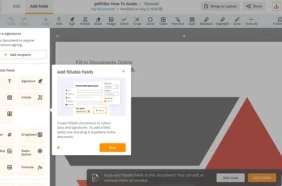
Custom Form Builder
Create tailored intake forms matching your specific business needs exactly.
Mobile Friendly Access
Let clients fill forms conveniently from smartphones or tablets anywhere.
Data Export Options
Export completed form responses directly into spreadsheets for easier organization.
Conditional Logic Fields
Show or hide form fields based on previous client responses automatically.
Instant Notifications
Receive alerts immediately when clients submit completed forms or documents.
Bulk Document Sending
Send identical forms to multiple clients simultaneously, saving significant administrative time.
Choosing the Right PDF Editor for You
The right editor should match your workflow, not create additional unnecessary complications.
Ease Of Use
pdfFiller offers an intuitive interface, so employees adapt quickly without lengthy training sessions or confusion.
Security And Compliance
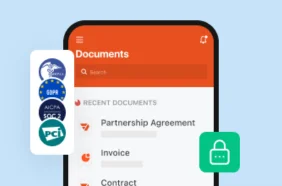
Choose editors offering encryption and compliance features, protecting sensitive client information and contract details properly.
Integration Capabilities
Look for tools connecting seamlessly with existing business software, email platforms, and cloud storage systems.
Customer Support Quality
Reliable support matters when urgent contract issues arise, so responsive help teams save valuable time.